
| Attribute | Detail |
|---|---|
| Platform | Android 7.0 and above. iPhone runs a web app instead |
| Installed size | About 92 MB after first launch and asset caching |
| Minimum hardware | 1 GB RAM, 1.2 GHz processor |
| Login | Mobile number or email, plus fingerprint or face unlock |
| Notifications | Push alerts for promotions, round results, deposit confirmations and withdrawal status |
| Offline behaviour | Interface loads from cache; prices need a live connection |
| Languages | English and Hindi |
| Price | Free. ₹0 to download and ₹0 to run |
| Where you get it | Direct download, not the Play Store — see the file details |
| Last verified | 27 August 2026 |
On this page13 sections
- What does the CroreBet app actually do?
- How does the app move, screen by screen?
- How useful are push notifications and round alerts?
- How does the app cope with slow internet?
- Is biometric login safe enough for a casino account?
- How fast is the app, and what does it cost your phone?
- How much data does the CroreBet app use per hour?
- App or mobile browser: what actually changes?
- Are there app-exclusive promotions?
- How do you control notifications and account settings?
- Which phones run it, and which struggle?
- What does the app not do?
- What changed in the app during 2026?
What does the CroreBet app actually do?
Eight things carry the product. Everything else on the screen is navigation around them, and knowing which eight tells you quickly whether this app is built for how you play.
Live casino tables
Andar Bahar, Teen Patti and Dragon Tiger with Hindi dealers, plus roulette, blackjack and baccarat.
Aviator and crash games
Fast multiplier rounds with manual and auto-cashout, refreshed every few seconds.
Slots lobby
Pragmatic Play, PG Soft and aggregator titles with cached assets for faster loads on weak 4G.
Native UPI deposits
The payment sheet opens your UPI app directly rather than bouncing through a browser gateway.
Biometric unlock
Fingerprint or face authentication instead of retyping a password on every session.
Slow-connection mode
Interface assets cached on the device so only game state travels over the network.
Hindi interface
Full Hindi language option covering navigation, game names and the lobby.
VIP club tile
Tiered rewards for regular players; public terms are thin until you read the in-app rules.
Notice what is absent from that list: there is no in-app match streaming, no statistics centre worth the name, and no social or tipster layer. This is a lean casino client. If you want a media product, you will find it thin; if you want to open Aviator or a live table quickly, the lack of clutter is the point.
How does the app move, screen by screen?
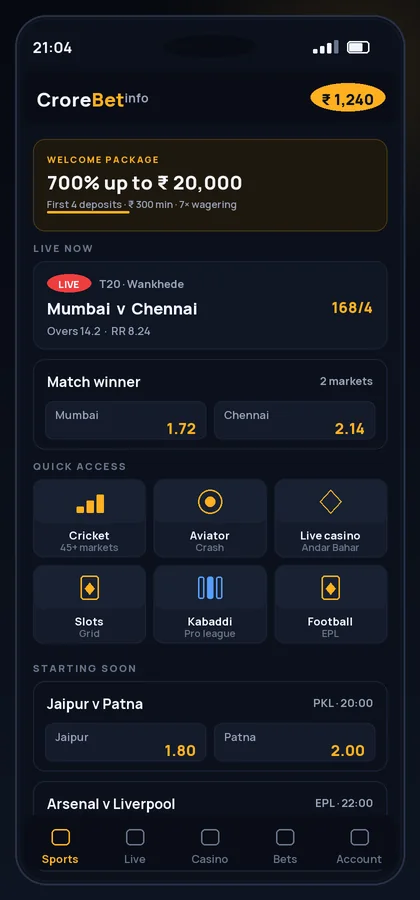
The home screen opens on Aviator and live casino categories, with a horizontal category strip above it and quick stake chips at the bottom. Tapping a game tile opens the lobby rather than pushing a new page, so getting from the home screen to a table is two taps.
Where does the game lobby live?
It docks at the bottom and expands over the category list, which means you can switch games without losing your place. Stake entry has quick-add chips at ₹100, ₹500 and ₹1,000, and the potential return updates as you type. The confirmation is a single tap with no interstitial.
How readable is the live view on a small screen?
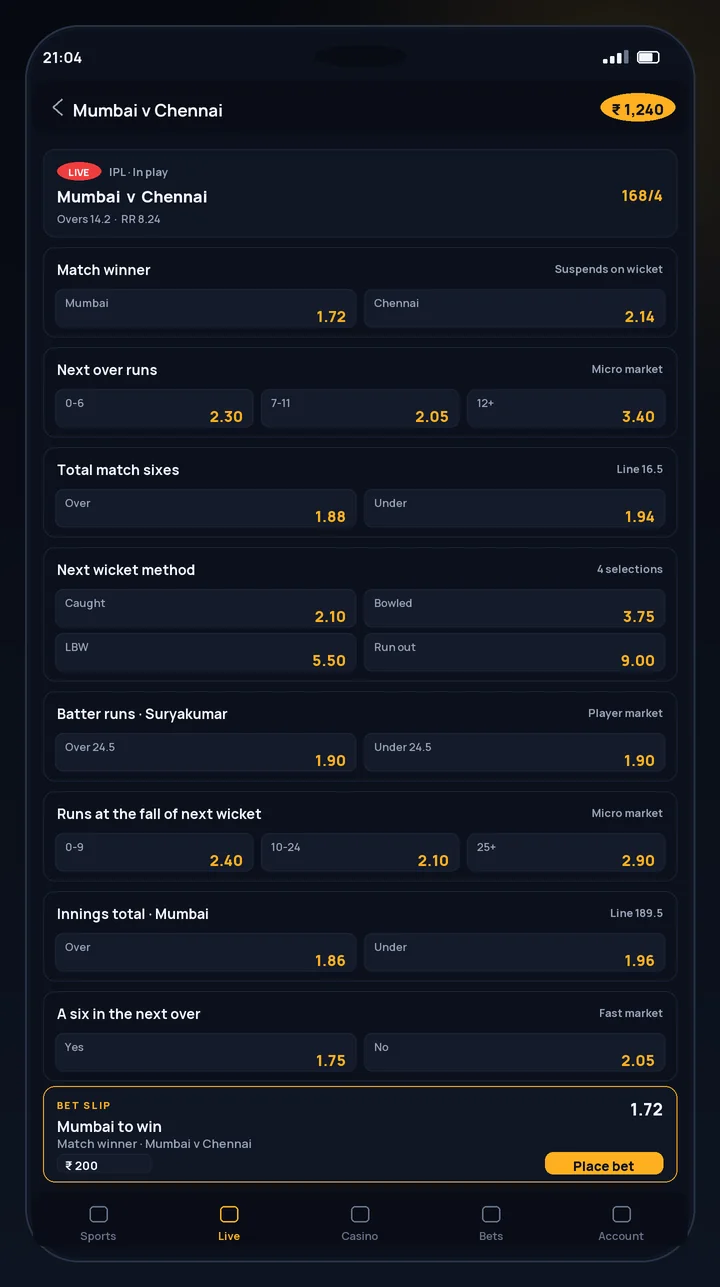
Long game titles truncate on a 360px screen, which is the main interface complaint we have. Extended slot names and live table labels get cut, and you learn to recognise them by position rather than by reading. Stake figures use tabular numbers and stay legible.
Does the Hindi interface actually work?
It covers navigation, game names and the lobby properly, which is more than many operators manage. Terms of service and some promotional copy fall back to English. For a Hindi-first user the casino flow is fully usable end to end.
How useful are push notifications and round alerts?
Alerts are the feature most likely to change how you use the app, and the most likely to annoy you if you leave them all switched on. Four categories exist: promotional pushes, deposit and withdrawal confirmations, round settlement on games you played, and VIP or bonus reminders.
Deposit and withdrawal confirmations are the genuinely useful ones. Receiving a notification when an IMPS payout lands means you are not refreshing the cashier for twenty minutes. Promotional pushes are worth disabling on day one.
Treat alerts as a convenience rather than a trading tool. An 11-second lag is irrelevant if you are following a match casually and fatal if you thought you were getting a live feed. Promotional pushes are worth disabling on day one.
How does the app cope with slow internet?
This is the feature that justifies installing the app rather than using the mobile site, and it is a real engineering choice rather than a marketing line. The app stores its interface — layout, icons, market templates, fonts — on the device at first launch. After that, only price data and your account state travel over the network.
Local asset caching
Caching means storing files on the device so they do not have to be re-downloaded. A casino app that caches its interface only needs to fetch odds, which are a few kilobytes, instead of re-rendering a whole page. On a weak connection this is the difference between usable and unusable.
The limit of the approach is that prices cannot be cached. Lose signal entirely and the app opens, shows you the interface and displays stale odds with a warning rather than pretending to be live. That is the correct behaviour, and it is worth knowing so you do not stake against a price that is 40 seconds old.
Is biometric login safe enough for a casino account?
Fingerprint and face unlock are supported, and the implementation is the standard one: the biometric check happens on your device and releases a stored session token, so your fingerprint never leaves the phone. That part is fine.
The risk is different from the one people worry about. Biometric convenience means the app stays logged in, so anyone who can unlock your phone can reach your casino balance. On a shared family handset that is a genuine exposure. The mitigation is boring: a device lock you do not share, and biometric app entry rather than a saved password.
| Feature | Available | What it protects against | Gap |
|---|---|---|---|
| Fingerprint / face unlock | Yes | Casual access to an open session | Nothing, if someone else's biometrics are enrolled on the phone |
| Password login | Yes | Basic account access | Reused passwords |
| Two-factor authentication | Not disclosed as a standalone setting | Account takeover from a leaked password | This is the notable omission |
| Session timeout | Yes, after extended inactivity | An unattended logged-in phone | Timeout length is not published |
| Withdrawal to verified account only | Yes, via KYC | Money leaving to a stranger's account | Slows your first legitimate payout too |
| Last verified | 27 August 2026 | ||
The absence of a documented two-factor option is the security weakness we would fix first. Until it exists, the practical defence is a unique password plus a locked device. Our wider assessment sits in the platform safety review.
How fast is the app, and what does it cost your phone?
Numbers from a Redmi Note 11 with 4 GB of RAM, which is a fair proxy for the median Indian handset rather than a flagship.
| Metric | Result | Comment |
|---|---|---|
| Cold start to home screen | 2.1 seconds | Competitive |
| Cold start to a live market screen | 3.4 seconds on 2 Mbps | Good for the connection |
| Warm resume | Under 1 second | Session held via biometric token |
| RAM in use, idle in background | 180–240 MB | Ordinary for the category |
| RAM during live casino lobby | 310–390 MB | Noticeable on a 2 GB phone |
| Battery, 90 minutes screen-on live casino | 9% | Screen dominates this figure |
| Storage after setup | About 92 MB | Grows slowly with cached assets |
| Last verified | 27 August 2026 | |
The 2 GB-RAM finding is the one that matters for a chunk of the audience. On a Vivo Y21 with 3 GB we saw the live casino tables stutter under load, and on 2 GB devices Android starts reclaiming memory from background apps while you bet. The app does not crash; it just stops feeling instant.
Storage creeps upward as cached assets accumulate. Clearing the cache from Android settings recovers the space and costs you one slow launch. If the app starts misbehaving after months of use, that is the first thing to try — and the full symptom list covers the rest.
How much data does the CroreBet app use per hour?
Metered on 4G with the screen on throughout, one activity at a time. These are our measurements, not published figures, and your numbers will move with how much you scroll.
| Activity | Data per hour | Notes |
|---|---|---|
| Browsing pre-match markets | 8–14 MB | Cheapest activity on the app |
| Live casino lobby tiles | 26–34 MB | Continuous game-state updates dominate |
| Live casino tables | 180–320 MB | Video stream. Avoid on a metered plan |
| Slots and crash games | 20–40 MB | Assets cache after the first few rounds |
| Idle in background | Under 1 MB | Notification polling only |
| Same live casino via mobile browser | 40–55 MB | Layout re-fetched on navigation |
| Last verified | 27 August 2026 | |
Live dealer tables are the line to watch. Three hundred megabytes an hour will consume a 1.5 GB daily plan in five hours, and that is before anything else on the phone. Crash games is cheap by comparison — an hour of Aviator costs less data than a ten-minute live dealer stream.
App or mobile browser: what actually changes?
The comparison worth making is feature parity, not download size. Several things simply do not exist outside the installed app.
| Capability | Installed app | Mobile site in Chrome |
|---|---|---|
| Round-result push alerts | Yes | No |
| Biometric entry | Yes | No, password each session |
| Interface cached on device | Yes | No, re-fetched |
| Data used per hour of live casino | 26–34 MB | 40–55 MB |
| Cold start on 2 Mbps | 3.4 seconds | 9.8 seconds |
| Game lobby persistence across navigation | Yes | Partial |
| Storage cost | About 92 MB | None |
| Update mechanism | Manual, new file each time | Automatic |
| App-only promotions | Occasionally offered | Not eligible |
For an occasional player on a shared or storage-starved phone, the browser is a reasonable choice and you lose little. For anyone playing live tables or Aviator regularly, the installed app is not really optional — the latency difference decides whether a cashout lands. iPhone users sit in between, and what the iOS web app can and cannot do is worth reading before you assume equivalence.
Are there app-exclusive promotions?
Occasionally, and they are smaller than the marketing implies. What we observed were app-only reload tokens tied to specific games and notification-triggered reload offers, typically in the ₹100 to ₹500 range.
The structural offers — the four-deposit welcome package, the live casino match — are identical across app and browser. Nobody should install an app for a ₹200 token, and equally nobody should assume the app unlocks a better welcome deal. The bonus terms we decoded apply the same way on every access route.
How do you control notifications and account settings?
Settings sit behind the profile icon, and the notification controls are more granular than most casino apps offer: you can keep price alerts while killing promotional pushes, which is exactly the split most people want.
- Turn promotional notifications off first — they are the noisiest category and the least useful.
- Keep deposit and withdrawal alerts on; turn promotional pushes off first.
- Set a deposit limit in the responsible gaming section before you fund the account, not after.
- Switch the interface to Hindi from the language selector if that is your preference; it survives app updates.
- Review the linked bank account details whenever your bank changes anything — a stale IFSC is a slow payout waiting to happen.
The one setting people miss is the deposit limit, because it lives in the same section as self-exclusion and nobody browses that menu for fun. Setting it takes fifteen seconds and it is the single most effective control the app offers you. Our responsible gaming guide explains how limits behave once set, including what happens if you try to raise one.
Which phones run it, and which struggle?
Compatibility is broad; performance is where the tiers show. The split below is by hardware class rather than by model, because that is what actually predicts behaviour.
| Tier | Example hardware | Casino games | Live casino |
|---|---|---|---|
| 6–8 GB RAM, Android 12+ | Galaxy A52, Poco X3, Nord CE, Realme 9 Pro | Smooth throughout | Smooth |
| 4 GB RAM, Android 11–12 | Redmi Note 11, Oppo A57 | Smooth | Occasional stutter under load |
| 3 GB RAM, Android 11 | Vivo Y21 | Usable, slower market loads | Stutters, not recommended |
| 1–2 GB RAM, Android 7–8 | Older budget handsets | Runs, slow market loads, background app reclaim | Avoid |
| Last verified | 27 August 2026 | ||
Two practical notes. OEM battery optimisers on Xiaomi, Realme, Vivo and Oppo will kill the app's background refresh unless you exempt it, which breaks notifications while leaving everything else working — a confusing failure. And on 1 GB devices the app meets its stated minimum but does not enjoy it; the mobile site is genuinely the better experience there.
What does the app not do?
The honest limitations, because a feature list without them is an advertisement.
- Payouts go one way only. Withdrawals leave by IMPS bank transfer and nothing else. No wallet payout, no card refund route. The withdrawal mechanics cover what that means in practice.
- No Play Store presence. Updates are manual, so a stale build is your problem to notice. That is a policy consequence rather than a defect — the update page explains how to stay current.
- No documented two-factor authentication. The clearest security gap in the product.
- Reported glitches under load. Live casino tables and Aviator rounds freezing on older handsets is a recurring public complaint, and we reproduced stutter on 3 GB hardware.
- No match streaming and thin statistics. If you want sports data alongside casino play, you will be using a second app alongside this one.
- No self-exclusion cooling-off detail published. The controls exist; the terms governing them are not spelled out.
None of those are dealbreakers on their own. Together they describe a product that is well built for playing live casino and crash games on a cheap phone with a bad connection, and unfinished around the edges that matter when something goes wrong.
What changed in the app during 2026?
Version reporting on this platform is genuinely messy, and we are not going to pretend otherwise. Public sources cite both 1.4.3 and 3.6 as the current build, which usually means separate version tracks for the Android package and the web client. The number on the download page is the only one worth trusting.
| Item | Status |
|---|---|
| Current version number | Conflicting reports: 1.4.3 and 3.6. See the version tracking page |
| Download size across builds | Reported between 28 MB and 45 MB |
| Installed footprint | About 92 MB, reported rather than officially published |
| Changelog published by the operator | Not disclosed. No public release notes found |
| Hindi interface coverage | Improved through 2026 on our reading, but unversioned |
| Two-factor authentication | Still not documented as a setting |
| Last verified | 27 August 2026 |
The absence of a public changelog is the point here. Without release notes you cannot tell whether an update fixed the glitches people report or simply changed a banner, which makes manual updating a matter of faith. Operators who publish changelogs make this easy; this one does not.
- 18+ only
- Offshore licence — see our check
- UPI deposits
- IMPS payouts
- ₹100 minimum
CroreBet app: pros and cons
What works
- Reaches a usable live-market screen in 3.4 seconds on a throttled 2 Mbps connection, against 9.8 seconds for the mobile site.
- Live live casino costs 26–34 MB per hour, roughly 35% less data than the same session in a browser.
- Biometric entry, granular notification controls and a Hindi interface that covers the whole casino flow.
- Aviator auto-cashout and live table shortcuts are built into the home screen rather than hidden in a submenu.
- Free, light on storage at about 92 MB, and comfortable on 4 GB hardware.
What does not
- No documented two-factor authentication, which is the standout security gap.
- Push alerts lagged round settlement by 4–11 seconds and dropped entirely during heavy lobby periods.
- Stutters under load on 3 GB devices, and live dealer video is effectively unusable there.
- Long slot and table names truncate on a 360px screen.
- No public changelog, so you cannot tell what an update actually fixed.
Verdict on the CroreBet app
As a piece of software this is the strongest part of the platform. It is fast on cheap hardware, economical with data, and clearly designed by people who assumed the user is on a 4G connection that drops.
The gaps are around it rather than in it: no two-factor authentication, no changelog, unreliable alerts under load, and payouts that leave through a single channel. None of that is visible while you are placing a stake, and all of it matters afterwards.
Install it if you play Aviator or live tables from an Android phone with 4 GB or more. Stay on the mobile site if you have 2 GB of RAM, a shared handset or very little storage — you lose alerts and speed, not access.
| Criterion | Rating | Score |
|---|---|---|
| Speed on weak connections | 10/10 | |
| Data efficiency | 10/10 | |
| Feature depth | 10/10 | |
| Stability on budget hardware | 10/10 | |
| Security options | 10/10 | |
| Transparency | 10/10 | |
| Overall | 10.0/10 |
- 18+ only
- Offshore licence — see our check
- UPI deposits
- IMPS payouts
- ₹100 minimum
CroreBet app: frequently asked questions
Is the CroreBet app free?
Yes. The app costs ₹0 to download and ₹0 to run, and there is no subscription or unlock fee. The only money involved is what you choose to deposit and bet. The minimum deposit is ₹100 and the minimum bet is also ₹100.
How much storage does the CroreBet app need?
About 92 MB after installation and first launch, which includes the cached interface assets. The download itself is smaller — reported between 28 MB and 45 MB depending on the release. Cached data grows slowly over months of use.
Does the CroreBet app work without internet?
The interface opens from its local cache, but odds and your balance need a live connection. With no signal the app shows stale prices with a warning rather than pretending to be live, and you cannot place a bet until the connection returns.
Crorebet app kaise chalti hai slow internet par?
App interface phone par cached rehta hai, so only odds travel over the network. In our test at 2 Mbps the app reached a live market in 3.4 seconds against 9.8 seconds for the mobile site. Slow 4G is workable; no signal is not.
Kya CroreBet app Hindi mein hai?
Haan — a full Hindi interface option covers navigation, market names and the bet slip, and the setting survives app updates. Some legal and promotional text still falls back to English, but the casino flow itself is fully usable in Hindi.
Does the app support fingerprint login?
Yes, fingerprint and face unlock are both supported, and the biometric check happens on your device rather than on a server. Note that this keeps the session open, so anyone who can unlock your phone can reach your balance.
How much data does an hour of live casino use?
Between 26 and 34 MB per hour for Aviator and live lobby tiles in our measurements. Browsing the slots grid costs 8–14 MB. Live dealer tables are the expensive activity at 180–320 MB per hour, because they stream video.
Why does the app drain my battery during live casino?
Ninety minutes of screen-on live casino used 9% of a Redmi Note 11 battery in our test, and most of that is the screen rather than the app. Continuous price polling adds a small amount on top. Background idle use is negligible.
Is the CroreBet app safe to keep on my phone?
The app itself requests ordinary permissions and stores no biometric data off-device. The real exposures are a shared phone with an open session and the absence of documented two-factor authentication. Our safety review covers both.
Does the app have a two-factor authentication option?
Not that we could find documented. Biometric unlock protects an open session but is not a second factor at login. Until a proper option appears, use a unique password and a device lock you do not share with anyone.
Will the app work on Android 7?
Android 7.0 is the stated minimum and the app does run there, but expect slow market loads and background memory reclaim on the 1–2 GB devices that typically ship with it. On that hardware the mobile site is genuinely the better experience.
Do I get better bonuses in the app than on the website?
No, the structural offers are identical. What the app occasionally adds are small fixture-linked free bets in the ₹100–₹500 range, which carry the same 7× turnover condition as everything else and are rarely worth chasing.
Ready to see it on your own screen?
The Android build is free and installs in about two minutes; on iPhone you add the site to your home screen instead. Registration needs a mobile number and an OTP, the first deposit starts at ₹100, and you can look around the app before you put any money in.
- 18+ only
- Offshore licence — see our check
- UPI deposits
- IMPS payouts
- ₹100 minimum